What Parents Should Look for Before Letting Kids Join an Online Game
Your child has been begging for weeks. All their friends are on it. It looks colorful, harmless, maybe educational.
So you say yes. And then, a month later, you’re down a rabbit hole of Reddit threads and news stories wondering what you just let into your home.
Online gaming is now one of the primary social spaces for children and tweens, and most parents are figuring it out on the fly.
Community and Social Platforms
Online games have come a long way from the retro-type consoles we were used to. Many of them function more like social platforms.
Kids chat, build friendships, share personal details, and sometimes encounter strangers with bad intentions.
Most of the multiplayer games your child wants to play include some form of text or voice chat. This opens the door to contact with people outside their real-world social circle.
An ‘Online Epidemic’
The legal and legislative landscape is also changing fast. In December 2025, a US House subcommittee advanced 18 child online safety bills. These bills include updated versions of COPPA 2.0 and the Kids Online Safety Act.
The subcommittee’s chair described what children face online as an “online epidemic.” That’s not alarmist language. That’s lawmakers responding to what they’re hearing from families.
The concern isn’t hearsay. Roblox, one of the most popular platforms among children under 13, has faced lawsuits related to child sexual abuse and grooming.
Parents have been raising alarms about predators, scams, and inappropriate content surfacing on the platform. The Roblox lawsuit is only one example. These underlying vulnerabilities exist across many games.
And despite numerous warnings, child protection advocates argue that Roblox failed to implement effective safety measures. The Roblox child safety lawsuit alleges that children were sexually abused and coerced into sharing explicit material.
TorHoerman Law says that some cases involve claims of sex trafficking and sexual assault. Now can you see what we’re up against?
The Checklist: What to Look For Before You Say Yes
Who Can Your Child Talk To?
An NB question. Does the game allow open chat with strangers? Is communication limited to an approved friends list?
Some games offer both options and let parents restrict to friends-only. Others have almost no moderation on public chat at all.
Scary Mom explains that voice chat is a particular area to watch. It’s less monitored than text chat and harder for kids to screenshot and report. Many games route voice communication through third-party apps like Discord. You don’t want your kids going there. Most of the platform’s users are hardcore adult gamers.
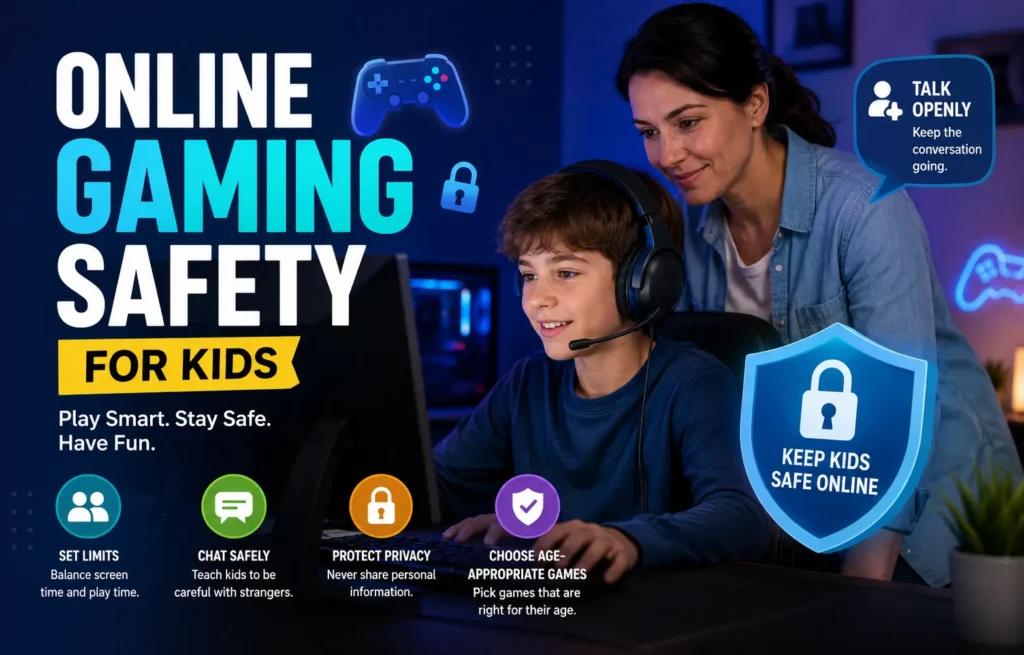
Before approving any game, check whether it has direct messaging, voice chat, or the ability to add strangers. Then decide which of those your child can access.
What Are the Age Restrictions, and Are They Enforced?
Most platforms set a minimum age of 13, in line with U.S. and international privacy laws.
Enforcement is another matter entirely.
Bitdefender warns that when kids lie about their age to create accounts, they lose access to the age-appropriate safeguards built into younger accounts. They can be anything from restricted chat and content filters to limited data collection.
Have an honest conversation with your child about why they must always use their legal age. It’s not about being left out. It’s about the safety settings that come with younger accounts being designed for them.
What Parental Controls Does the Game Offer?
Parental controls are not standard. Some platforms give parents tools, such as:
- The ability to set screen time limits and view activity reports.
- Restrict purchases.
- Limit who can contact your child.
Others offer a parental control section that exists mostly on paper.
Minecraft, for example, has several privacy settings and parental controls through Microsoft Family Safety that can limit a child’s exposure on public servers.
Before approving a game, spend 15 minutes in the settings yourself. If parental controls are hard to find or thin on options, that tells you something.
What Kind of Content Can Users Create or Share?
Games like Roblox are built on user-generated content. The game itself might be rated E for Everyone. But specific “experiences” or servers within it can contain content that is anything but child-appropriate.
Inappropriate content embedded in user-created games is a recurring issue on platforms, making it difficult to moderate millions of player-made experiences in real time.
Ask:
- Does the platform vet user-created content before it goes live, or is moderation reactive?
- Is there an easy way for your child to report something they see?
- Do you, as a parent, get notified when they flag something?
What Does It Want From You at Sign-Up?
Several apps and games that seem child-friendly collect far more personal data than most parents realize. Location. Contact lists. Microphone access. Usage patterns. These are all unnecessary tasks.
Look at what permissions the app requests during installation and what information it collects at sign-up. If it’s asking for your child’s phone number or location, ask yourself why a game needs that.
Also check the privacy policy for whether data is shared with third parties or used for targeted advertising.
Is There a Clear Reporting and Blocking System?
Your child will probably encounter something uncomfortable at some point. A rude player. An unsolicited message. Or something worse.
“As our children grow up, they become more digitally skilled and more aware of the abuse they can face, yet at the same time, they are less likely to seek help when they are exposed to these abuses.” – MFWS chairperson Marie Louise Coleiro Preca via Times Malta.
What matters is that they have an easy, accessible way to report it and that the platform actually acts on it.
Walk through the reporting process with your child before they start playing. Make sure they know how to block another user, how to screenshot a conversation, and that they should always come to you first rather than trying to handle it alone.
Online Gaming Safety: Key Statistics
| Stat | Detail | Source |
| Child online safety bills advanced in the US House | 18 bills, including COPPA 2.0 and KOSA, advanced by the House subcommittee in December 2025 | Tech Policy Press |
| Roblox minimum age | 13 (or with parental consent for younger users), yet millions of under-13s play on the platform | Today’s Parent |
| Minecraft monthly active players | Over 170 million monthly active players globally; one of the most popular games for children under 12 | Bitfinder |
| Voice chat in multiplayer games | Many popular multiplayer games include voice chat features, routed through external apps that carry their own safety risks | Scary Mommy |
The Bigger Picture
Lawmakers are pushing platforms to do more. Nonetheless, legislation moves slowly, and the responsibility of keeping kids safe online sits largely with parents.
You don’t have to say no to every game. Many online games offer genuine social connection, creativity, and teamwork skills.
The goal isn’t to cut your child off from digital life. Rather, it’s to help them navigate it with your eyes open alongside them.
FAQs
What age is appropriate for kids to start playing online multiplayer games?
Most platforms set a minimum age of 13 under COPPA regulations, but many younger children play with parental supervision.
How do I know if a game is really safe or just marketed as safe?
Don’t rely on the rating alone. Look at the features. Does it have open chat with strangers? Can users share photos or personal information? Is there user-generated content that isn’t pre-moderated?
My child wants to use Discord to talk with their gaming friends. Is that OK?
Discord can be fine when used within a private, known-friends server. It does, however, have a minimum age of 13, and its public servers can expose children to adult content and strangers.
What should I do if my child has already encountered something inappropriate in a game?
Stay calm and thank them for telling you. Your reaction will set the tone for whether they come to you again. Take screenshots or document what happened. Report it through the game’s platform.