
How Students Can Decode Binary Numbers into Readable Text

We all know that binary is the language of computers. Every action performed through a computer is processed and stored in the form of 0s and 1s. To many students, the long sequence of binary digits often appears confusing, with no obvious meaning.
The reality many don’t realize is that these binary numbers can be translated into readable text, allowing students to understand their hidden meaning. Additionally, learning binary-to-text conversion can also help them understand how exactly computers store, process, and communicate information.
In today’s blog post, we are going to explain how students can accurately decode binary data into understandable language.
Two Methods for Students to Effectively Decode Binary Numbers into Readable Text
Below, we have discussed two methods for converting binary data into readable text for students. They can go with either one based on their personal preferences.
- Using the Manual, Standard Procedure
There is a standard step-by-step procedure that students can follow to understand and convert binary codes into plain text. Below, we have explained those steps along with proper examples.
Divide the binary numbers into 8-bit groups:
First, divide the binary numbers into 8-bit chunks. One chunk is often called a “Byte,” and one byte represents one character.
Here is the binary data set that we will be using in this guide:
0100001101101111011011010111000001110101011101000110010101110010
Now, let’s understand how you can divide them.
- Divide the binary string into 8-bit groups from left to right. If the final group has fewer than 8 bits, add leading zeros to complete the byte.
- Keep repeating this process until all groups are created.
Note: If the leftover numbers of the last group are fewer than 8, then add zeros at the start of those numbers. For example, 1011 will become 00001011.
By following this approach, we have broken down the above binary data into different groups as follows:
01000011 – 01101111 – 01101101 – 01110000 – 01110101 – 01110100 – 01100101 – 01110010
Convert each group to decimal:
Now, students need to convert each 8-bit group into decimal. For this, the positional value method (powers of 2) is widely used.
We are going to convert this “01000011” 8-bit chunk into decimal first.
Start by assigning the value of 2 to each digit from right to left, as we did.
- 0 × 27
- 1 × 26
- 0 × 25
- 0 × 24
- 0 × 23
- 0 × 22
- 1 × 21
- 1 × 20
Now, multiply each binary digit (0 and 1) by the place value assigned to it.
| Multiply | Final Output |
| 0 × 27 = 0 × 128 | 0 |
| 1 × 26 = 1 × 64 | 64 |
| 0 × 25 = 0 × 32 | 0 |
| 0 × 24 = 0 × 16 | 0 |
| 0 × 23 = 0 × 8 | 0 |
| 0 × 22 = 0 × 4 | 0 |
| 1 × 21 = 1 × 2 | 2 |
| 1 × 20 = 1 × 1 | 1 |
Sum the output result (64 + 2 +1), which is 67. This means 01000011 = 67.
Apply this process to all 8-bit groups and get their decimal values, as we got in the table below.
| 01000011 | 67 |
| 01101111 | 111 |
| 01101101 | 109 |
| 01110000 | 112 |
| 01110101 | 117 |
| 01110100 | 116 |
| 01100101 | 101 |
| 01110010 | 114 |
Match decimal values to ASCII characters:
Students now have to refer to an ASCII chart to match and convert each decimal number into its corresponding character. After matching, the characters we got are as follows.
| 67 = C |
| 111 = o |
| 109 = m |
| 112 = p |
| 117 = u |
| 116 = t |
| 101 = e |
| 114 = r |
Combine characters:
Finally, combine all individual characters to form a word/phrase.
So, this binary set: 01000011 01101111 01101101 01110000 01110101 01110100 01100101 01110010 translates into the word “Computer.”
- Use a Binary Translator Tool
Another method that students can use to decode binary numbers into readable text is by using a specialized binary translation tool. It works by converting entered binary data into plain text with a single click.
There is a huge variety of such translators available on the internet. Among many options, Prepostseo’s Binary Translator stands out as a reliable choice. It is free, has a good ranking on Google, and does not ask for sign-up or registration.
For demonstration, we processed the same binary data (used above) through this tool, and the result is:
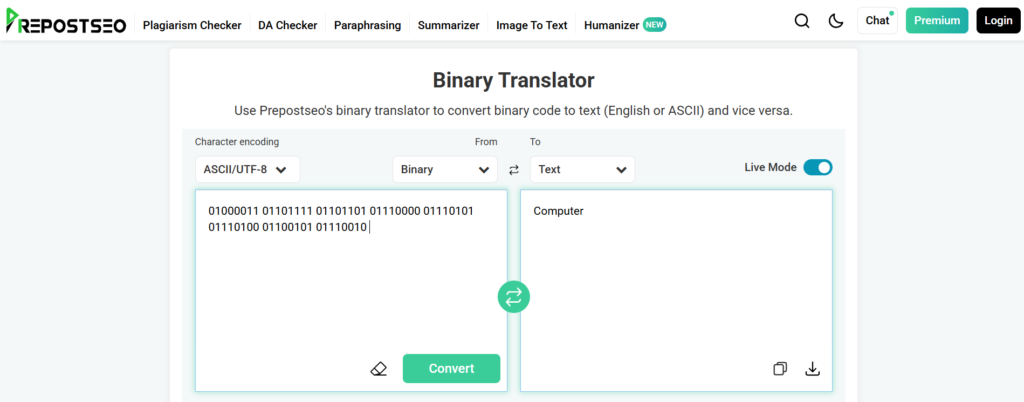
Relying on such solutions can save time and help reduce the chances of decoding errors. So, these are the methods that students can use to accurately translate binary numbers into plain text.
Wrapping It Up
Decoding binary numbers into readable text can be useful for students. It helps them understand how computers store and process information in the form of 0s and 1s. This way, students can build a stronger foundation in computer science and develop better logical thinking skills.
Although the decoding process usually appears complex at first glance, following the right methods that we have discussed above can make the process easier.